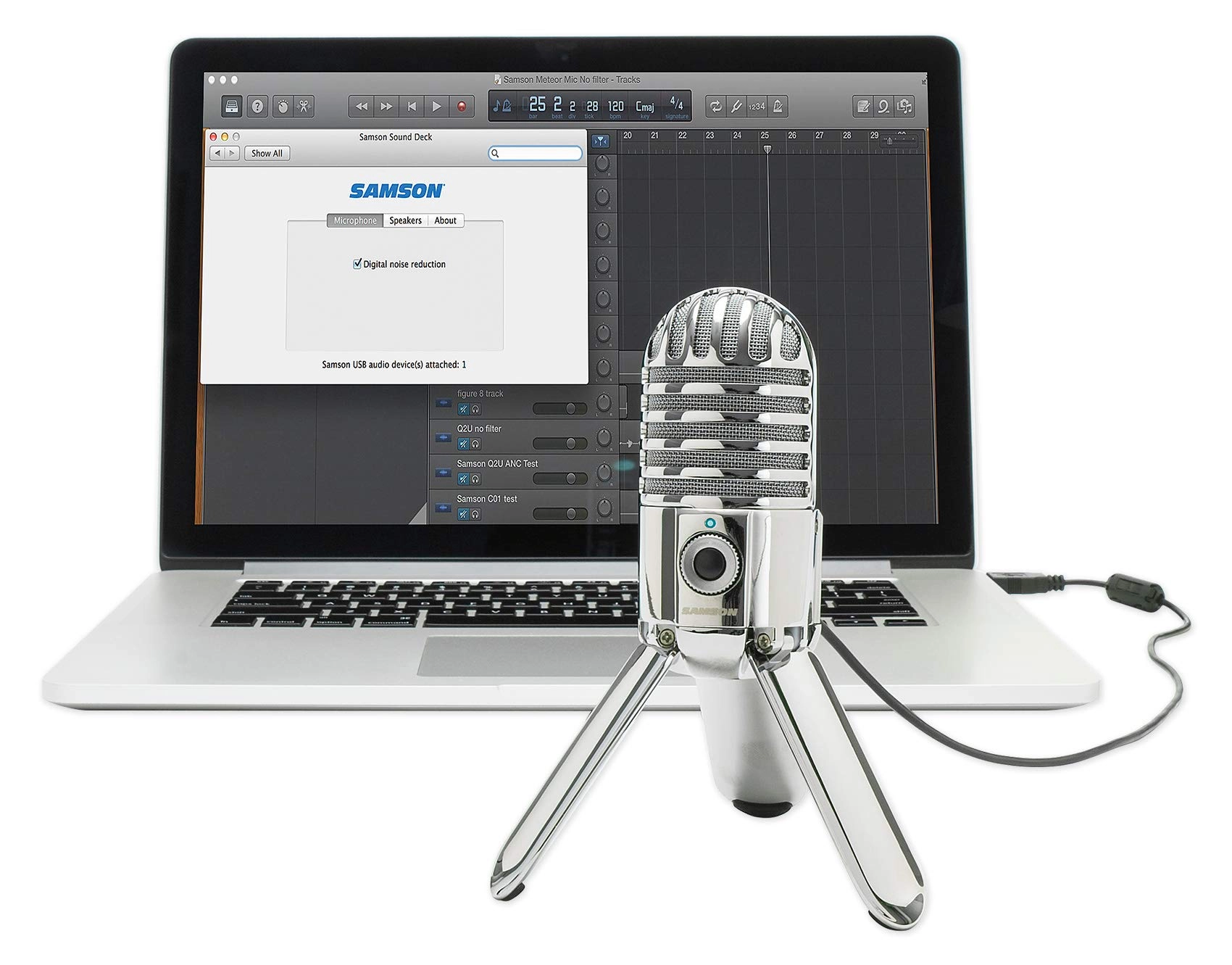
From the manufacturer Break On Through. Meteor Mic is a portable
USB studio condenser microphone for recording directly to your
computer. Perfect for your home studio, Meteor Mic is also ideal
for podcasting, music recording, gaming, Skype or streaming. With
Meteor Mic, you can make incredible recordings that are out of
this world. Plugs directly into any computer with a USB input, no
drivers required Compatible with most computer-based digital
audio workstation software Cardioid pickup pattern 16-bit,
44.1/48kHz resolution Smooth, flat frequency response of
20Hz–20kHz Stereo 1/8" headphone jack for no latency monitoring
Headphone volume control with microphone mute switch Fold-back
leg design provides optimal mic positioning Works with iPhone or
iPad using Apple's Lightning USB Camera Adapter Solid And Sound
Producing rich audio recording for any application, Meteor Mic
features a large 1" (25mm) proprietary studio capsule with a
wide, smooth frequency response that captures every nuance of
your vocal or instrument performance. Its cardioid pickup pattern
records sounds that are directly in front of microphone,
minimizing off-axis sound from entering your project. Making the
Magic Since there's no need for drivers, you can start recording
right out of the box on any computer. And Meteor Mic is
compatible with most computer digital audio workstations, video
conferencing and VOIP software. And 16-bit, 44.1/48kHz resolution
give you professional audio results no matter what you're
recording. Record in Style Meteor Mic is designed to allow you to
sound your best wherever your projects take you. The fold-back
leg design allows the microphone to be easily transported
anywhere and to adjust to the optimal position for any recording
application. An integrated mic stand adapter on the bottom of the
microphone enables it to be mounted to a boom arm or desktop
stand.
Review: Excellent full sound suitable for most needs. May need to
replace the USB lead for best performance - After doing some
research and listening to the options online this microphone
seemed like the best combination of price and sound quality.
Another option was the Fifine K670 if you want to save some money
(Also an excellent option but very subtly flatter sound). I
thought an online sample of the Blue Snowball also sounded more
electronic. Certainly for podcasting or videoconferencing the
Meteor will do the job. The sound quality varies with how close
it is to your mouth with the richest sound if you are within
around 20cm, but perfectly decent sound at arm length. It is very
sensitive so will pick up fan noise from a PC. I found when on
the desk with my computer the fan noise was transmitted though
the desk so it sounds better placed on a piece of foam or other
insulation if you don't want to go for a mic boom arm. Also with
the included USB lead there was a very slight whine audible on
playback which was absent when using shorter, or better quality
leads. Seems a bit of an oversight to supply a good quality
microphone with suboptimal lead. Fortunately most people are
likely to have other Mini USB leads around. The compact size is a
bonus if you want to keep the microphone out of view and the
quirky look is good. It feels solid and good quality. The legs
can apparently be removed if you want to put it on another mount.
Review: Not Perfect, But Close Enough. Fix For Red Light Issue!!!
- Stylistically, this is as good as you're going to get for
sub-£50. The folding legs which act as a stand are excellent, and
can even be removed by unscrewing if necessary. The microphone
gives a very clear sound which is great for Skype and this is the
limit of what I'm currently using it for. All in all I'm very
satisfied with what this microphone does. The reason for four
stars instead of five. Firmware, and support, or lack of it
within the UK. I experienced the red light syndrome associated
with these microphones. This means, on a Mac, that the mic is
only recognised as an Advanced USB Device and not as the Samson
Meteor Microphone. Though the microphone still functioned as per
usual on Skype for example, as I use dictation quite a bit this
was a nightmare as I had to re-input the microphone as an input
source, and it went from being an approved device, to an unknown
device. Nightmare. Trawling through Samson's own website I found
nothing. I then went to Youtube and found very little until
stumbling onto a video in Italian which featured a page on
Samson's website I'd never seen before. This only offers a
Windows solution, so as I have a Mac I gave the microphone to a
friend, who followed all the instructions, returning me with a
Microphone with a blue light! The mic is now recognised by my
system again, and it's all sorted. Google 'Meteor Mic Fix for
Windows' and choose the first result, if you want to fix the red
light issue and return to blue heaven. For those with specific
Windows 10 issues, you'll also find a link on the Samson page to
another with instructions.