Envelopes, Glossy paper, Matte paper, Photo Paper, Plain paper
Copying
Duplex copying
✗
Input & output capacity
Maximum input capacity
100 sheets
System requirements
Mac operating systems supported
Mac OS X 10.10 Yosemite, Mac OS X 10.11 El Capitan, Mac OS X 10.12 Sierra, Mac OS X 10.13 High Sierra, Mac OS X 10.14 Mojave, Mac OS X 10.8 Mountain Lion, Mac OS X 10.9 Mavericks
Windows operating systems supported
Windows 10, Windows 7, Windows 8.1
Mobile operating systems supported
Android, Windows 10 Mobile
Other features
Mobile printing technologies
Apple AirPrint, Google Cloud Print, Mopria Print Service, PIXMA Cloud Link
Print speed (black, normal quality, A4/US Letter)
12.60 ppm
Colour faxing
✗
Copier resize
25 - 400 %
Print speed (colour, normal quality, A4/US Letter)
9 ppm
Storage
Compatible memory cards
MicroSD (TransFlash), MiniSD, MiniSDHC, SD, SDHC
Design
Built-in display
✓
Market positioning
Home & Office
Packaging content
Cables included
AC
Network
Wi-Fi
✓
Wi-Fi standards
802.11b, 802.11g, Wi-Fi 4 (802.11n)
Ethernet LAN
✗
Ports & interfaces
USB port
✓
USB connector
USB Type-B
USB 2.0 ports quantity
1
Direct printing
✓
Operational conditions
Operating temperature (T-T)
10 - 35 °C
Operating relative humidity (H-H)
10 - 80 %
Technical details
Printing
Colour printing
Copying
Colour copying
Printing
Number of print cartridges
5
Duplex printing
✗
Scanning
Scanner type
Flatbed scanner
Scan technology
CIS
Scanning
Colour scanning
Fax
Faxing
No
Product Details
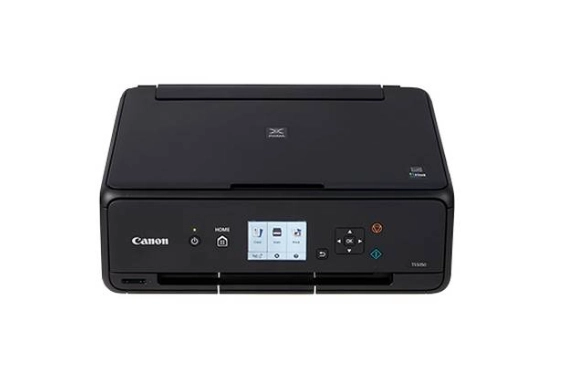
Canon PIXMA TS5040
Introducing the PIXMA TS5040. The latest in affordable home colour printing, copying and scanning.
The ultimate home printer
Take the hassle out of home printing. Quickly access scan, copy and print functions thanks to an easily adjustable front panel and 7.5 cm LCD display. An innovative rear paper feeder allows you to print borderless photos at home in under 40 seconds.
Perfectly proportioned
Experience a lean, space-saving form factor approx 40% smaller than previous models*. Clever contrasting textures, rounded corners and tapering contours make the printer’s already-small frame appear even smaller. An elegant addition to any desk or home office.
Print from anywhere
PIXMA TS5040’s built-in Wi-Fi means you can print from your smart device or computer via support for Android, iOS, Google Cloud Print and Windows 10 Mobile. You can also share all your favourite moments from your Wi-Fi enabled camera, or using the built-in SD card slot.
Vivid print quality
Affordable price, superior technology. TS5040’s FINE inkjet print head and 5 single inks print every photo in beautifully intricate detail.
Discover the new PIXMA
Take a look at PIXMA TS5040’s new and improved features.
Get social
Capture your favourite social media snaps thanks to PIXMA Cloud Link and square paper support. Download the Canon print app and print directly from Facebook and Instagram using Canon’s 13x13 cm (5”x5”) Photo Paper.
Easy operation
PIXMA TS5040 is quick and easy to use thanks to a redesigned user interface. From the printer display to the Canon PRINT app, you can now enjoy consistent printing and scanning with all your photos and documents.
Innovative design
More compact than ever before, PIXMA TS5040 includes a selection of brand new features including a document removal reminder, manually tilt front panel and a rear paper feed for fast, convenient printing.
Large 7.5cm screen
Easy to navigate printer functions
Borderless printing
10x15cm (4”x6”) photos in just 39 seconds
5 single inks
Only change the ink that runs out
PIXMA Cloud Link
Print from and scan to the cloud
SD card
Print from SD memory cards