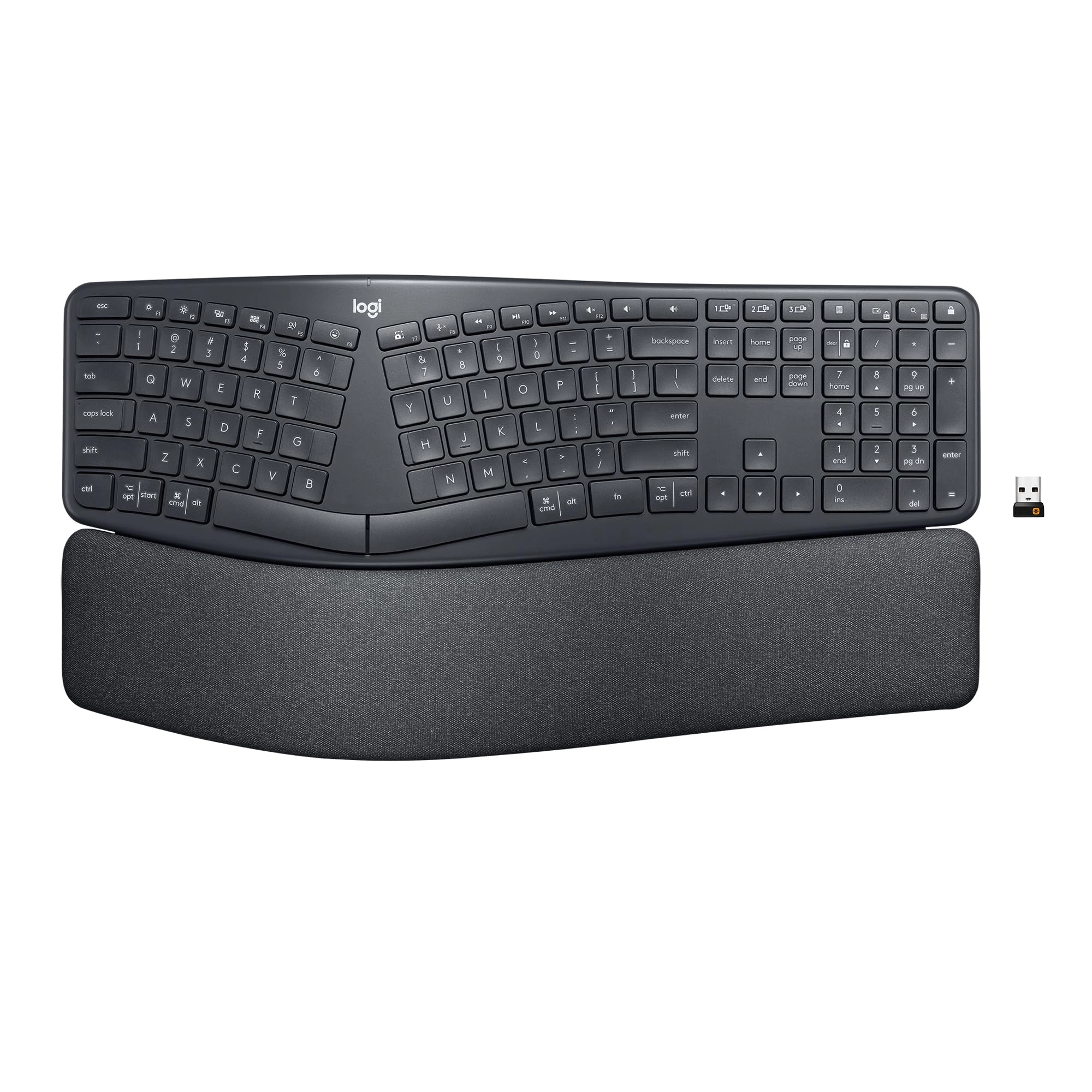
Type more naturally with ERGO K860 - an advanced ergonomic
keyboard that promotes a more relaxed typing posture – reducing
wrist bending by 25% and offering 54% more wrist support. The
curved, split keyframe reduces muscle strain on your wrists and
forearms. And the pillowed wrist rest offers comfort and the
optimal ergonomic position. The adjustable palm lift feature
keeps your wrists in a natural posture, whether you're seated or
standing. You’ll confidently type on Perfect Stroke keys—crafted
for precision and fluidity. And an integrated numpad,
multi-device capabilities, and two-year battery life ensure that
you won’t compromise performance for ergonomics.
Review: Really nice ergo keyboard! - I'm in IT - I'm at a
computer all day, every day. I had a boss early in my career who
had severe carpal tunnel issues and he always preached
ergonomics. Due to that I've been using an ergonomic keyboard for
the last 17 years, specifically the Microsoft Ergonomic 4000.
That keyboard is no longer produced but I've loved it, it's held
up well, and I've never had any issues with my wrists from typing
all day. I recently got a new job and decided to upgrade my
keyboard for the first time since 2007. The Logitech ERGO K860
came up in most searches for the best ergo keyboard in 2024 so I
decided to give it a shot. I couldn't be happier with it. The
shape and key placement is very similar to my beloved MSE 4000.
They keys are much quieter and very pleasant to type on. I was a
little concerned that the "scooped keys" in the product
description would be deep divots like I've seen on some keyboards
and don't care for, but I needn't have worried. These are just
ever-so-slightly scooped, in a way that's barely noticeable until
you focus on it, but enough that it does make a positive impact
on typing. It's well constructed and feels like it'll hold up for
a long time (we'll see if I can get another 17 years!). The wrist
rest is really comfy, nice and wide, and not a material that
seems like it will wear out or get gross over time. It connected
easily to two laptops and my phone, one laptop with the USB
receiver and the other two via Bluetooth. Typing is nice and
responsive and I don't detect any delay with typing. I like that
the function keys can be customized via the Logi Options+ app,
although the default functions are pretty good right out of the
box. I already had the Logi Options+ app for my MX Master 3 mouse
(best mouse I've ever used!) but it wouldn't recognize the
keyboard until I updated it to the latest version, not a big deal
though. The only change I'd make to it is the batteries. It runs
on two AAA batteries. That's fine I suppose, I do have
rechargable AAAs I can use. I'd prefer that the keyboard be USB
rechargeable like the MX Master 3 mouse - charge it once every
few months and then don't worry about it. Now when the batteries
on this keyboard run low I'll have to go searching for batteries
to replace them instead of just plugging it in for a bit. Not my
favorite, but it's not huge deal. Overall incredibly happy with
this keyboard! It's definitely a good successor to my Microsoft
Ergonomic 4000!
Review: Finally a suitable replacement....MS 7000 you have been
replaced. - I have finally found it! I have been using
Microsoft’s wireless keyboard 7000 for years and have bought so
many replacements for frozen keys, non reactive keys etc. I even
stocked up when I could find decently priced ones on eBay. Every
other style that I bought that claimed to be ergonomic was an
epic fail until now. Getting tired of repainting letters on my
existing Microsoft 7000, I saw a Logitech one at Staples and
thought maybe. But after getting it home and finding my wrists
bumping and bent because the layout was too straight, I decided
to look here. I read review after review, looked at the pictures
and thought, why not? I couldn’t be any more happier with this
purchase! Right out of the box I liked the feel and look of it
but was concerned about the height of the keys themselves as I’ve
never really like laptop keyboards and liked to hear the “click”
of they key. But after a week of use, I am ecstatic with this
keyboard. I have found a new favorite. Granted the test of time
isn’t met yet, but so far it is great. I am so glad i took the
chance with it. I had both of my wrists for carpal tunnel
repaired a few years ago and the layout of the true ergonomic
keyboard was a must. I can’t type with any other. i give this 5
stars without hesitation! Possibly it’s a bit high in price, but
when you need it and must have it, you’ll pay for it. If you look
at pricing for the classic Microsoft 7000 then you’ll see what
demand can charge for popularity. The more I use it, the more I
love it. If you’re not a must have user of the split style
keyboard, you probably won’t like this. But for those of you out
there that do, I don’t think you will be disappointed. Thank you
Logitech for having this unit. I wish I had found this long ago.
MAY 28, 2020 update: I have used this keyboard for a few months
now and still maintain that it is a great replacement for the old
Microsoft 4000 or 7000 (un-wired). Over time I have noticed that
I have an issue with my right hand wanting to go just a bit more
to the right so I am off a key or I reach to back space and am
hitting the print screen button. The J key does have it's marker
so I know it's the home key by touch, but my initial reach is
wider and I start tying and then realize I put my hand down
incorrectly. That coupled with the Dash Key (-) on the Keypad
having the logoff button right above it has makes me logoff up to
several times a workday. So I am looking around for another
suitable unit. Don't get me wrong, I think most of you will love
the layout of this keyboard and like it very much. It's just
problematic for "me". So don't hesitate, but if you have the so
called "fat fingers" you might have the same issues I am having.
I still give this keyboard a "5" as it is a great keyboard but
just a bit too short for my liking. After using this for awhile I
still haven't been able to retrain my position. The logoff key is
the most problematic issue for me as I over-reach the dash key on
the keypad A LOT. I use the keypad all the time so that one key
is just in the way for me. Being logged off is irritating.
However, I did get used to the low profile of the keys and the
typing is very soft and fluid. Had the keyboard been .5 to 1"
wider where the keys could have been a bit larger, it would have
not felt so pinched and I probably wouldn't have the right hand
issues I am having. It's still a great keyboard. In the absence
of another one with a better layout, I will still continue using
this one.