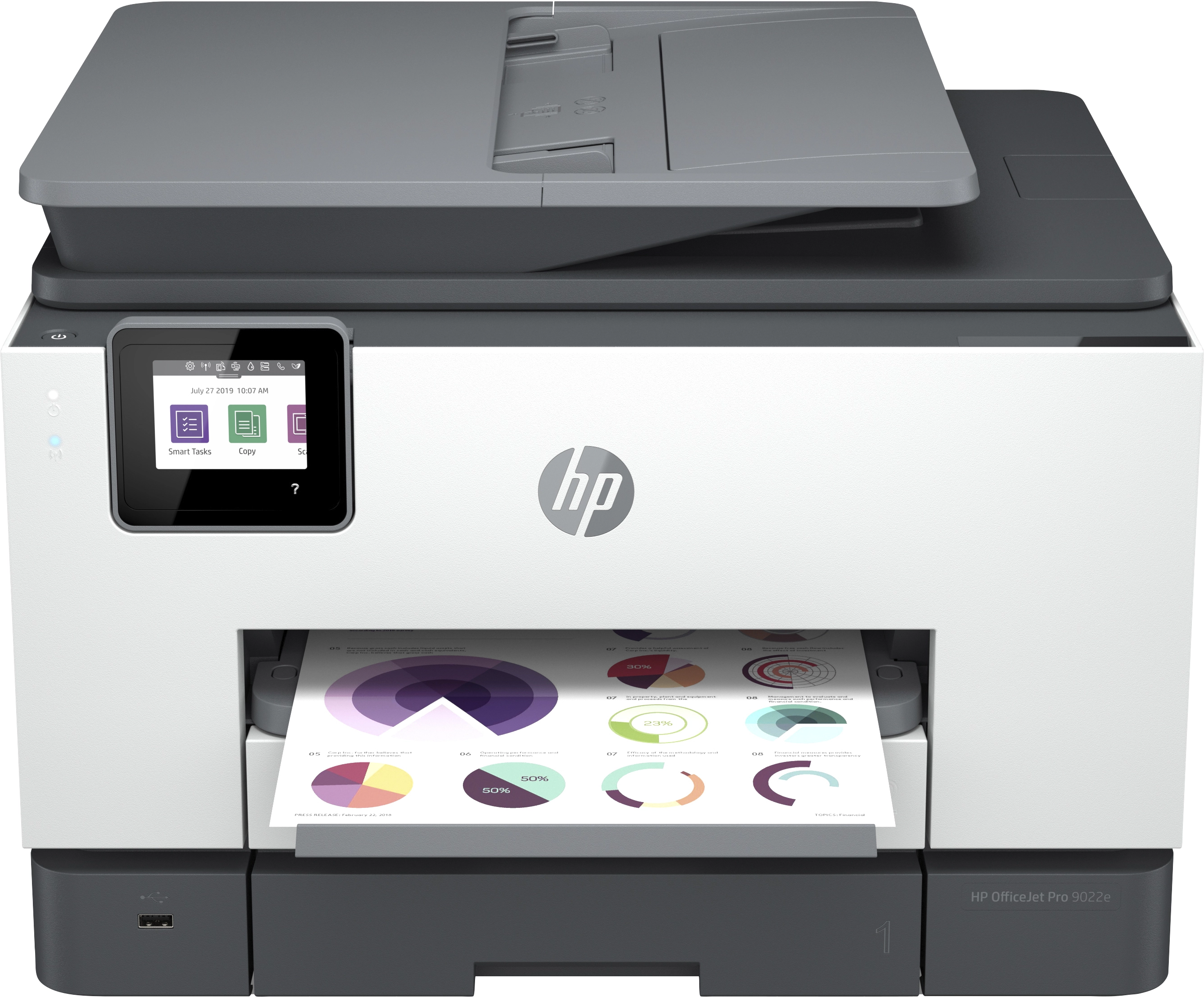
HP Officejet PRO 9022E - Inkjet Color
Key Features
- Faxing: Colour faxing
- Duplex faxing: Yes
- Duplex copying: Yes
- Print resolution colour: 4800 x 1200DPI
- Print resolution black: 1200 x 1200DPI
- Total number of input trays: 2
- Scanning: Colour scanning
- Fax resolution (black): 300 x 300DPI
- Fax resolution (colour): 200 x 200DPI
- Fax transmission speed: 4sec/page
- Copy speed (black, draft, A4): 39cpm
- ID-card copy function: Yes
- Auto fit function: Yes
- Auto document feeder (ADF): Yes
- Scan speed (black): 15inch/min
Specifications
Features
Packaging data
Weight & dimensions
Display
Power
Performance
Paper handling
Copying
Input & output capacity
System requirements
Other features
Design
Computer system
Packaging content
Network
Ports & interfaces
Operational conditions
Technical details
Memory
Printing
Scanning
Fax
Phone features
Call management
File formats
Brand-specific features
Logistics data
Carbon footprint
Product Details
Designed to save you time
Eliminate steps in repetitive tasks, using Shortcuts.<sup>[2]</sup> Scan to the cloud, email, and more – in a tap.<sup>[2]</sup> Work fast and hands-free with the 35 page auto-feeder. Get automatic two-sided printing. Take control of print, scan, copy, and fax jobs with tap-and-swipe ease, using the colour touchscreen. Easily print, scan, and copy from your phone, using HP Smart – best-in-class print app.<sup>[2,3]</sup>
Never run out of ink with Instant Ink<sup>[4]</sup>
Never run out of ink.<sup>[4]</sup> Convenient ink cartridge replacements and smart delivery included. Save up to 70% with Instant Ink.<sup>[5]</sup> Enroll to get ink, delivery and recycling starting at £1.49 a month. Peace of mind with plan flexibility to change or cancel anytime at no cost.<sup>[6]</sup> Help us put plastic back into printers with prepaid recycling service included.<sup>[7]</sup>
HP+. HP's smart printing system.
A cloud-connected HP+ printer is smarter - it keeps itself up to date and ready to print.<sup>[8]</sup> First 3 months of Instant Ink included<sup>[9]</sup>; after 3 months, monthly fee charged automatically unless cancelled. Print and scan from the palm of your hand. Enjoy advanced productivity features for 2 years with HP+.<sup>[2]</sup> For every page you print with HP+, HP protects or restores forests in equal measure<sup>[10]</sup>
Enhanced security, reliable connections
Reduce interruptions with self-healing Wi-Fi® that keeps you connected.<sup>[11]</sup> Get security essentials to help maintain privacy and control. Count on chatbot support and helpful notifications with the HP Smart app.<sup>[2]</sup> Easily share resources – access and print with wireless and Ethernet networking.<sup>[11]</sup>
Create editable, searchable documents
With Shortcuts in HP Smart app, you can create editable, searchable documents by scanning from your phone or printer. <sup>[2]</sup>
Two-sided. Hands-free. Auto-fed
Work fast and hands-free with the 35 page auto-feeder. Quickly scan both sides of a page at once.
Print at high volumes with dual-tray capacity
Take on high-volume jobs with confidence, using two 250 sheet paper trays that fit a full ream of paper.
Printing just got more productive
Quickly access and print documents and images on your smartphone, from Dropbox and Google Drive. <sup>[2]</sup>
Your reliable connection
Reduce interruptions with self-healing Wi-Fi™ that keeps you connected. <sup>[11]</sup>
Enhanced security
Get security essentials to help maintain privacy and control. <sup>[12]</sup>
Worry-free printer support
Get chatbot support and helpful notifications with the HP Smart app. <sup>[2]</sup>
Printing that gives you more
An HP+ printer is ready when you are, more secure and productive than ever.<sup>[8]</sup> <sup>[8]</sup>
Printing that gives you more.
Introducing HP+. Get more value and HP’s most effortless printing experience all for using Original HP ink.
Customisable shortcuts on your phone or printer
Eliminate steps in repetitive tasks with Shortcuts in HP Smart app. <sup>[2]</sup>
Amazing scanning, now on your smartphone
Get high-quality scanning, and share to Dropbox, Google Drive, email, or the cloud – from virtually anywhere. <sup>[2]</sup>
Files
Images
Videos
Reviews
Join our newsletter
Be the first to know about new arrivals, sales, and exclusive picks
Sign in to unlock newsletter access and stay in the loop