Allware
Loading...
  • News
  • Price drops
  • New arrivals
  • Featured categories
  1. Entertainment & Hobby
  2. Video Games & Consoles
  3. Gaming Controllers
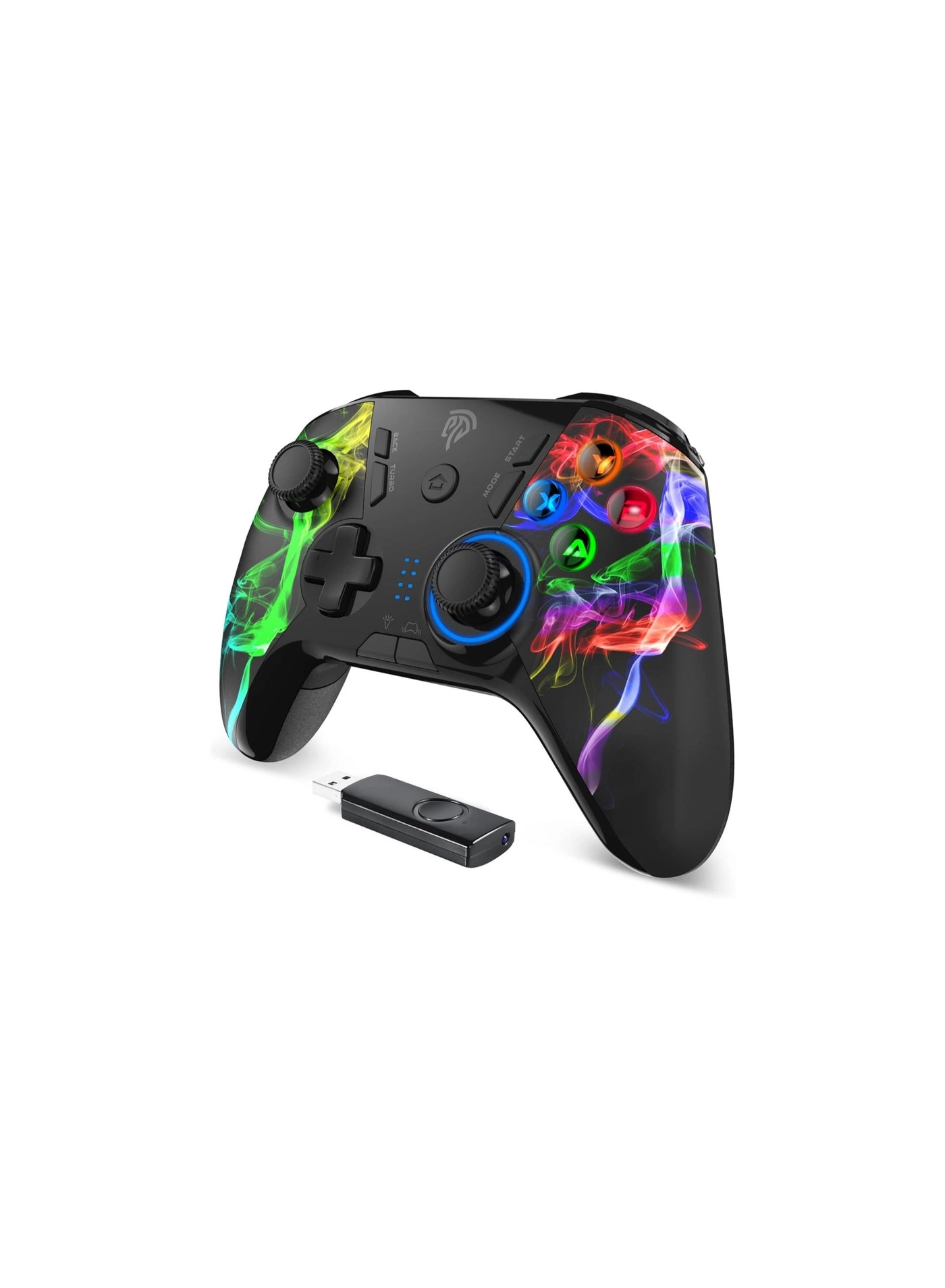
G5 Pro - White PC, NS, iOS, Android, TV Box

Generic G5 Pro - White PC, NS, iOS, Android, TV Box

Best offer
AED
18900
AED
23500
-19%

Key Features

  • Weight: 220g
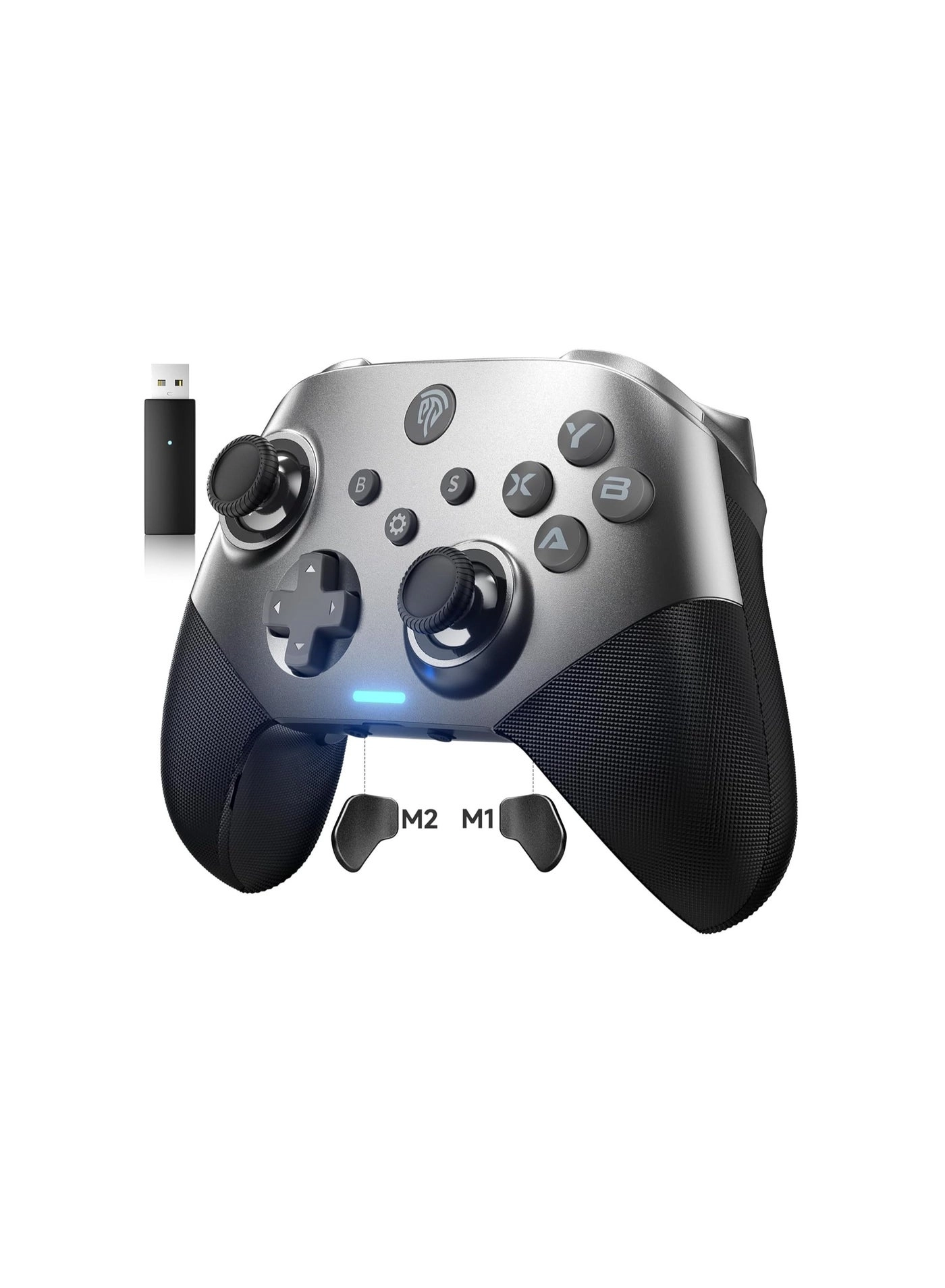
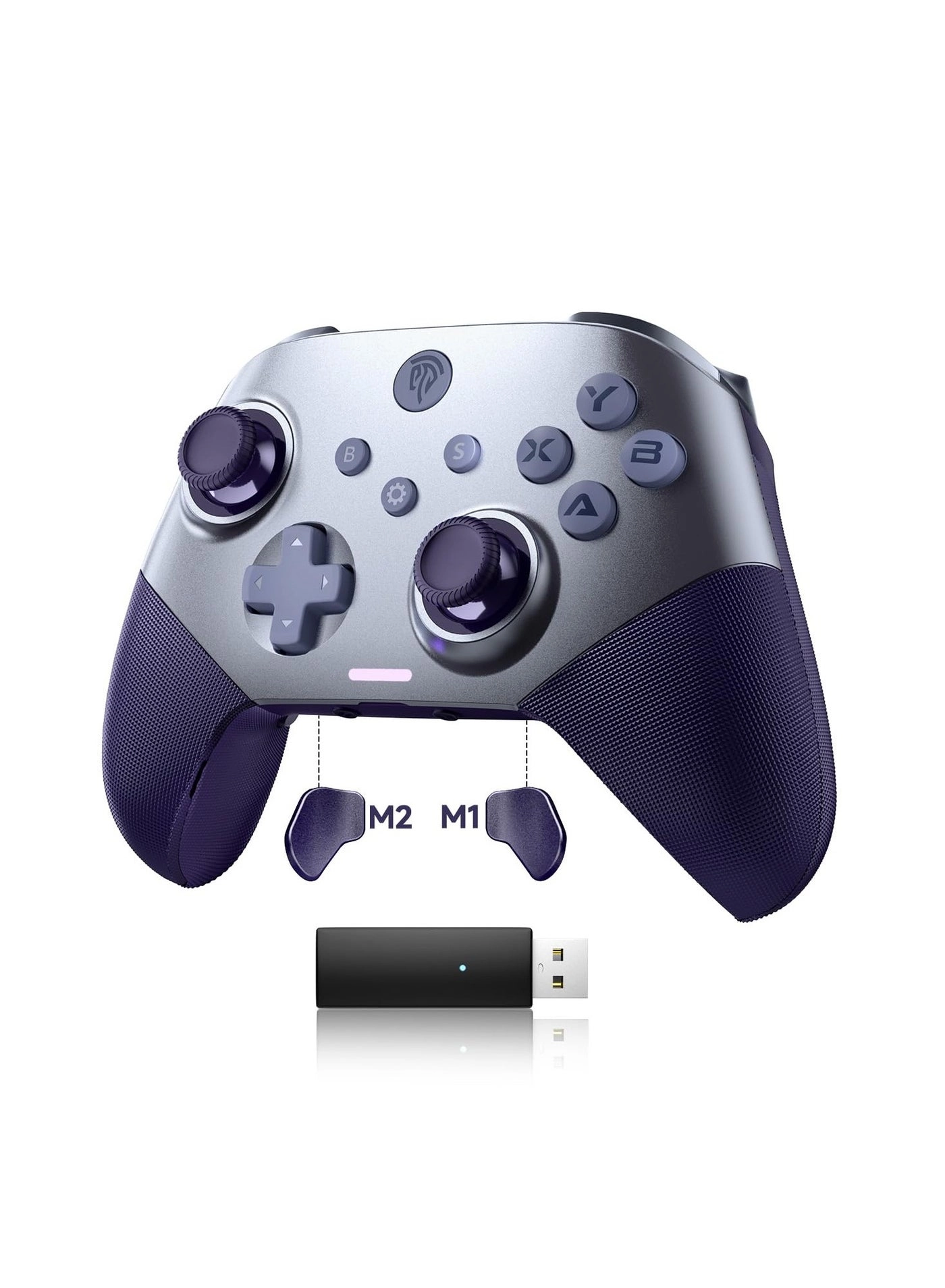
  • Box contents: Handle*1 Receiver*1 Data cable*1 User manual*1 Sticker*1
  • Offers
  • Price History
  • Specifications
  • Product Details
  • Review IconReviews

Specifications

Packaging data

Box contents
Handle*1 Receiver*1 Data cable*1 User manual*1 Sticker*1

Weight & dimensions

Weight
220 g

Product Details

Electrical parameters:

1. Working current: 15mA(RGB Light off), 130mA(RGB Light on)

2. Static current: lt;10uA

3. Charging current: 260mA

4. Charging hours: ~2.5 hours

5. Battery endurance: 10 hours

6. Battery capacity: 500mAh/3.7V

7. Vibration: Yes

8. Support platform: Android / IOS (MFI) / Tablet / PC / Nintendo Switch / PS3 / PS4

RGB Light

There are 8 different lighting effects: gradual color change, red, green, blue, yellow, cyan, purple, and white. You can change the lighting effect by pressing the light on.

Turbo Function Setting

Action keys ( A / B / X / Y / L / ZL / R / ZR ) also support the turbo function

1. Press and hold Turbo + tap once Action keys to turn on the burst function.

2. Press and hold Turbo + tap once Action keys to set the Auto burst function.

3. Press and hold Turbo + tap once Action keys to clear the turbo function.

Programming function

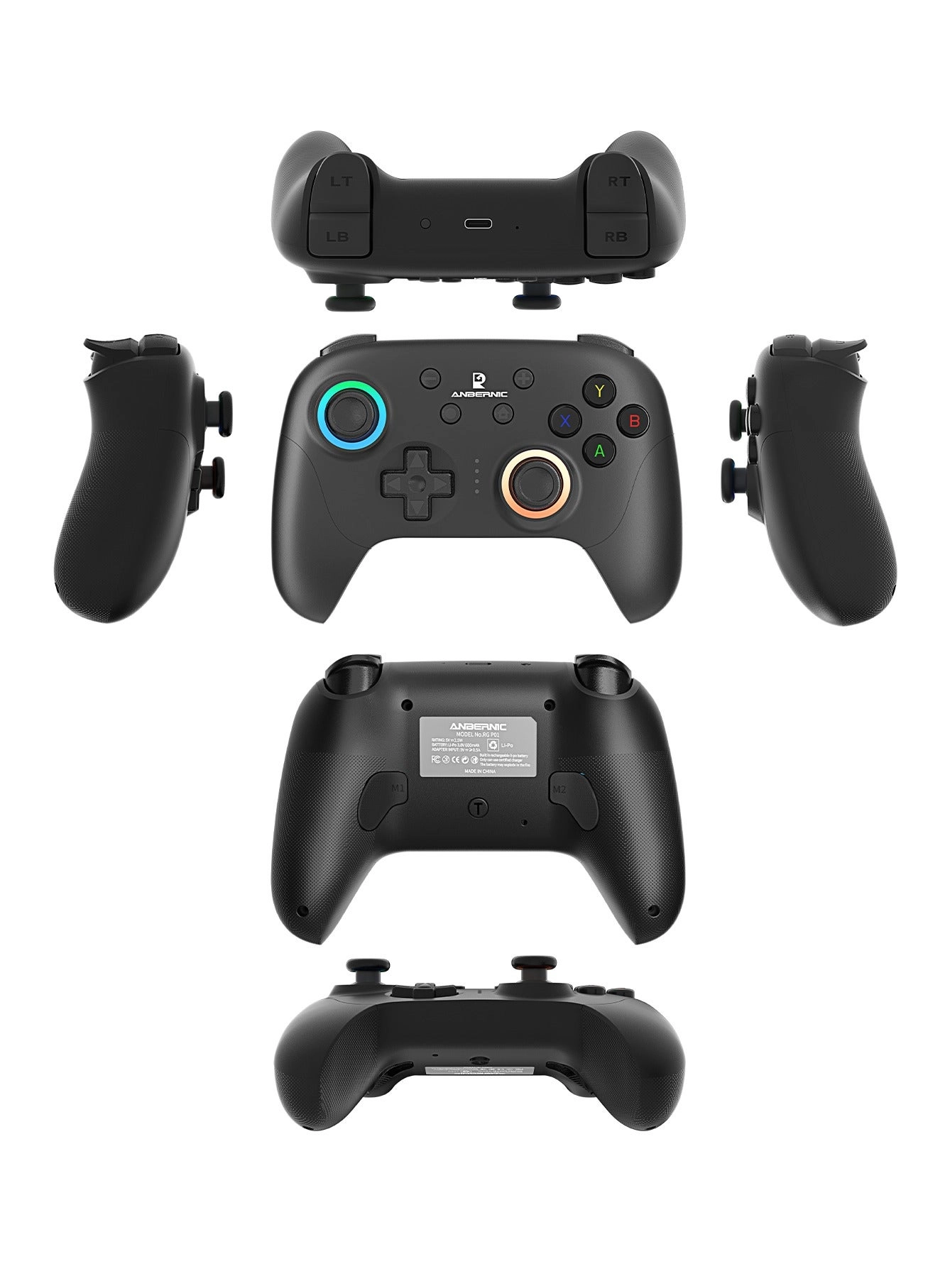
1. There are two programming ons on the bottom of the controller, M1 and M2.

2. Each programming on can be used to map a single action on or program multiple ons(e.g.,A/B/X/Y/L/ZL/R/ZR/L3/R3/Up/Down/Left/Right) can all be programmed.

3. Each programming on can support up to 14 key combinations.

4. The programming ons do not have TURBO rapid-fire functionality.

5. The programming ons have a memory function. Regardless of whether the controller is in sleep mode, powered off, or restarted, the controller will remember the last programmed configuration.

Programming Steps:

6. Press and hold the programming on (M1 or M2) and the MACRO on for 3 seconds.

The LED indicator 1 or 2 will flash rapidly. Release the ons to enter programming mode.

7. Press one or multiple regular function ons (such as pressing one or more keys fromA/B/X/Y/L/ZL/R/ZR/L3/R3/Up/Down/Left/Right as a combination). Press the corresponding programming on again to confirm and exit, completing the programming. The mode indicator light will return to its previous state.

8. Press and hold the MACRO on and the M1 (or M2) on for 3 seconds. After programming starts, if the M1 (or M2) on is not pressed within 50 seconds, the controller will automatically save the programmed key combination to the M1 (or M2) on and exit programming mode.

9. After successful programming, the programming on will have the same function as the single or multiple ons that were programmed.Clearing Programming Function:

10. Simultaneously press and hold the programming on to be cleared (M1 or M2) and the MACRO on. The LED indicator 1 or 2 will flash rapidly. Release the ons.

11. Press the programming on that needs to have its function canceled again to confirm and automatically exit. The mode indicator light will return to its previous state, and the programming function will be cleared.

Reviews

Loading...
Loading...
Loading...
Loading...
Loading...
Loading...
Loading...
Loading...
Loading...
Loading...
Loading...
Loading...
Loading...
Loading...
Loading...
Loading...
Loading...
Loading...
Loading...
Loading...
Loading...
Loading...
Loading...
Loading...
Loading...
Loading...
Loading...
Loading...
Loading...
Loading...
Loading...
Loading...
Loading...
Loading...
Loading...
Loading...
Loading...
Loading...
Loading...
Loading...
Loading...
Loading...
Loading...
Loading...
Loading...
Loading...
Loading...
Loading...
Loading...
Loading...
Loading...
Loading...
Loading...
Loading...
Loading...
Loading...
Loading...
Loading...
Loading...
Loading...
Loading...
Loading...
Loading...

Join our newsletter

Be the first to know about new arrivals, sales, and exclusive picks

Sign in to unlock newsletter access and stay in the loop

Allware
info@allware.com
+971522500911
World technology awards winner badge

Allware

  • About Us
  • Terms And Conditions
  • Privacy Policy
  • Contact Us

Partners

  • Why become a partner?
  • How to list your Online Shop?

Newsletter

  • Subscribe

Info

  • How Allware works
All Rights Reserved.
Please enable location access or select an emirate
-
00:00:00
Prayer timings

Offers (2)

Noon logo

2 offers

From
AED
189

MACHENIKE HG510W Pro Wireless Gamepad Controller USB/Bluetooth 5.0/2.4G, with Programmable ons, Joystick, Hall Trigger, Kaihua Micro Switch, Switch Remote Gamepad for PC, NS, iOS, Android, TV Box

AED
23500
-19%
AED
18900

Price History

Price History Skeleton
Price History Shimmer Effect
Loading price history...

Similar Products

See all
GameSir Nintendo Switch/Android/iOS/Windows PC T4 Pro - Bluetooth 2.4Ghz

GameSir Nintendo Switch/Android/iOS/Windows PC T4 Pro - Bluetooth 2.4Ghz

AED
9900
10 offers
-62%
GameSir Nova Lite - WHITE PC iPhone Android Switch & Steam Deck

GameSir Nova Lite - WHITE PC iPhone Android Switch & Steam Deck

AED
18800
AED
7000
14 offers
GameSir G8 Galileo - WHITE Xbox PlayStation PC

GameSir G8 Galileo - WHITE Xbox PlayStation PC

AED
22600
3 offers
Microsoft Xbox One Wireless Controller Green

Microsoft Xbox One Wireless Controller Green

AED
42300
2 offers
-7%
Beauenty D8 - White iPhone Android PC Nintendo Switch PS4

Beauenty D8 - White iPhone Android PC Nintendo Switch PS4

AED
11900
AED
11000
30 offers
KASTWAVE D8 Telescopic Mobile Phone Gamepad - Android iOS PS3 PS4 Switch PC

KASTWAVE D8 Telescopic Mobile Phone Gamepad - Android iOS PS3 PS4 Switch PC

AED
9995
24 offers
8Bitdo SN30 Pro - Jade Green Switch Windows Mac OS Android Steam

8Bitdo SN30 Pro - Jade Green Switch Windows Mac OS Android Steam

AED
10590
14 offers
BIGBIGWON Rainbow2 Pro Elite - PC Nintendo Switch Android iOS

BIGBIGWON Rainbow2 Pro Elite - PC Nintendo Switch Android iOS

AED
24500
7 offers
-50%
Beauenty X2s Bluetooth - iOS Android PC

Beauenty X2s Bluetooth - iOS Android PC

AED
39275
AED
19635
7 offers
-54%
Easysmx X20 - PC NS TV Phone Laptop

Easysmx X20 - PC NS TV Phone Laptop

AED
57600
AED
26100
6 offers

More from Generic

See all
Generic Zbook Studio G5 4NL28UT - 15.6'' Core i7

Generic Zbook Studio G5 4NL28UT - 15.6'' Core i7

AED
10 81299
1 offer
-61%
Generic Moka Pot H23063

Generic Moka Pot H23063

AED
5000
AED
1920
4 offers
Generic Mini Wireless Keyboard - RGB Backlight

Generic Mini Wireless Keyboard - RGB Backlight

Unavailable
1 offer
Generic Wall Mounted Washing Machine

Generic Wall Mounted Washing Machine

AED
2 40100
3 offers
Generic Single-Serve Personal Coffee Maker - 14oz Capacity, Includes 12oz Travel Mug

Generic Single-Serve Personal Coffee Maker - 14oz Capacity, Includes 12oz Travel Mug

AED
8000
1 offer
Generic Z83672DF6EDFDF4521E25Z

Generic Z83672DF6EDFDF4521E25Z

AED
19385
1 offer
-30%
Generic Automatic Turkish Coffee Maker - 250ml (4 Cup) One-Touch Operation 600 W

Generic Automatic Turkish Coffee Maker - 250ml (4 Cup) One-Touch Operation 600 W

AED
14000
AED
9800
1 offer
Generic Float and Rotate in Air Levitating M005B-23

Generic Float and Rotate in Air Levitating M005B-23

AED
24800
1 offer
Generic Air Pods Pro Wireless Earbud

Generic Air Pods Pro Wireless Earbud

AED
4000
1 offer
Generic AX3

Generic AX3

Unavailable
4 offers
Loading...
Loading...
Loading...
Loading...
Loading...
Loading...
Loading...
Loading...
Loading...
Loading...
Loading...
Loading...
Loading...
Loading...
Loading...
Loading...
Loading...
Loading...
Loading...
Loading...
Loading...
Loading...
Loading...
Loading...
Loading...
Loading...
Loading...
Loading...
Loading...
Loading...
Loading...
Loading...
Loading...
Loading...
Loading...
Loading...
Loading...
Loading...
Loading...
Loading...
Loading...
Loading...
Loading...
Loading...
Loading...