CZUR Tech Shine Ultra - USB
Best offer
AED
86199
Key Features
- Resolution: 5696 x 4272pixels
- Scanner type: Document
- Weight: 1000g
- Batteries included: No
- Minimum system requirements: Windows 7
- Country of origin: China
Specifications
Features
Country of origin
China
Resolution
5696 x 4272 pixels
Weight & dimensions
Weight
1000 g
System requirements
Minimum system requirements
Windows 7
Packaging content
Batteries included
✗
Scanning
Scanner type
Document
Product Details
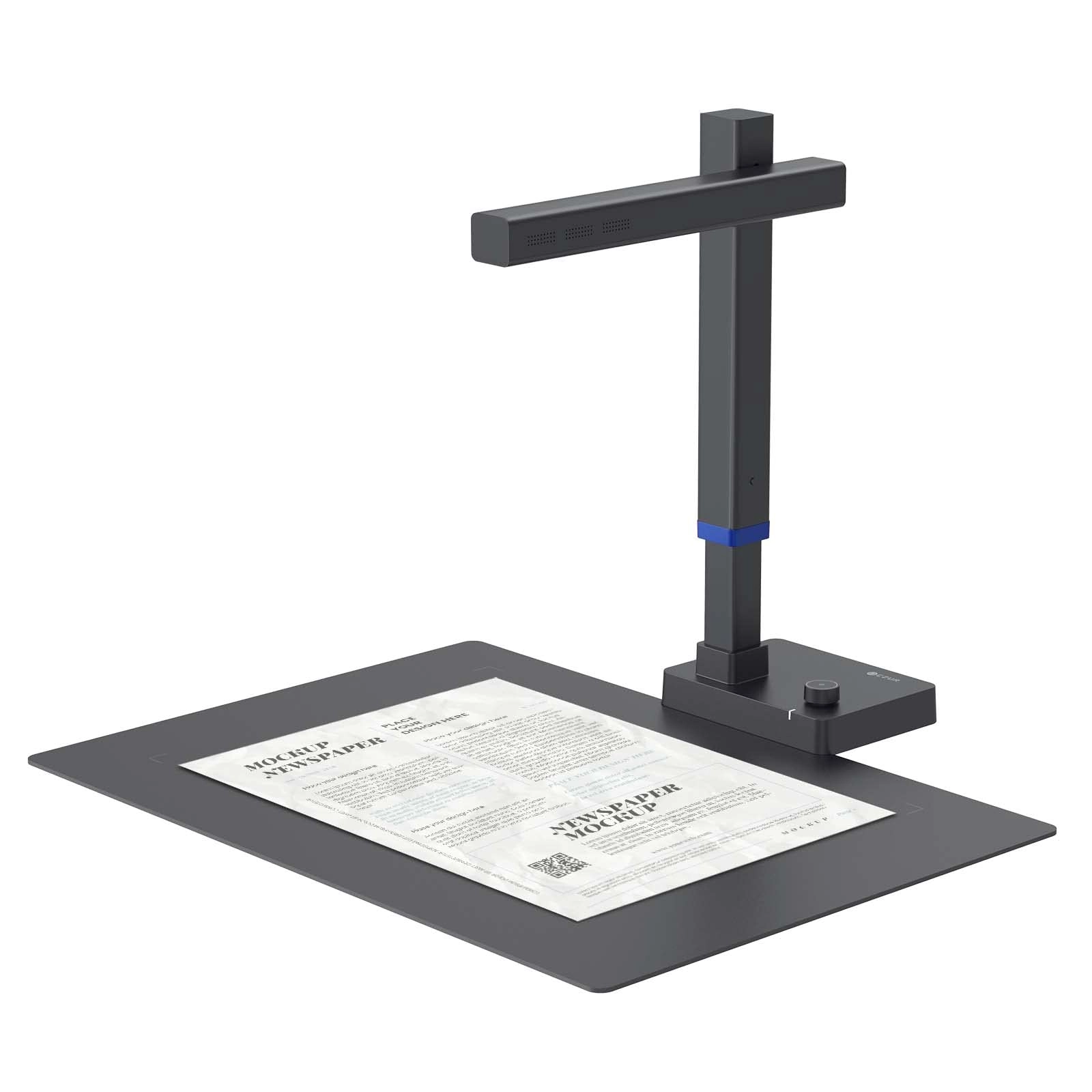
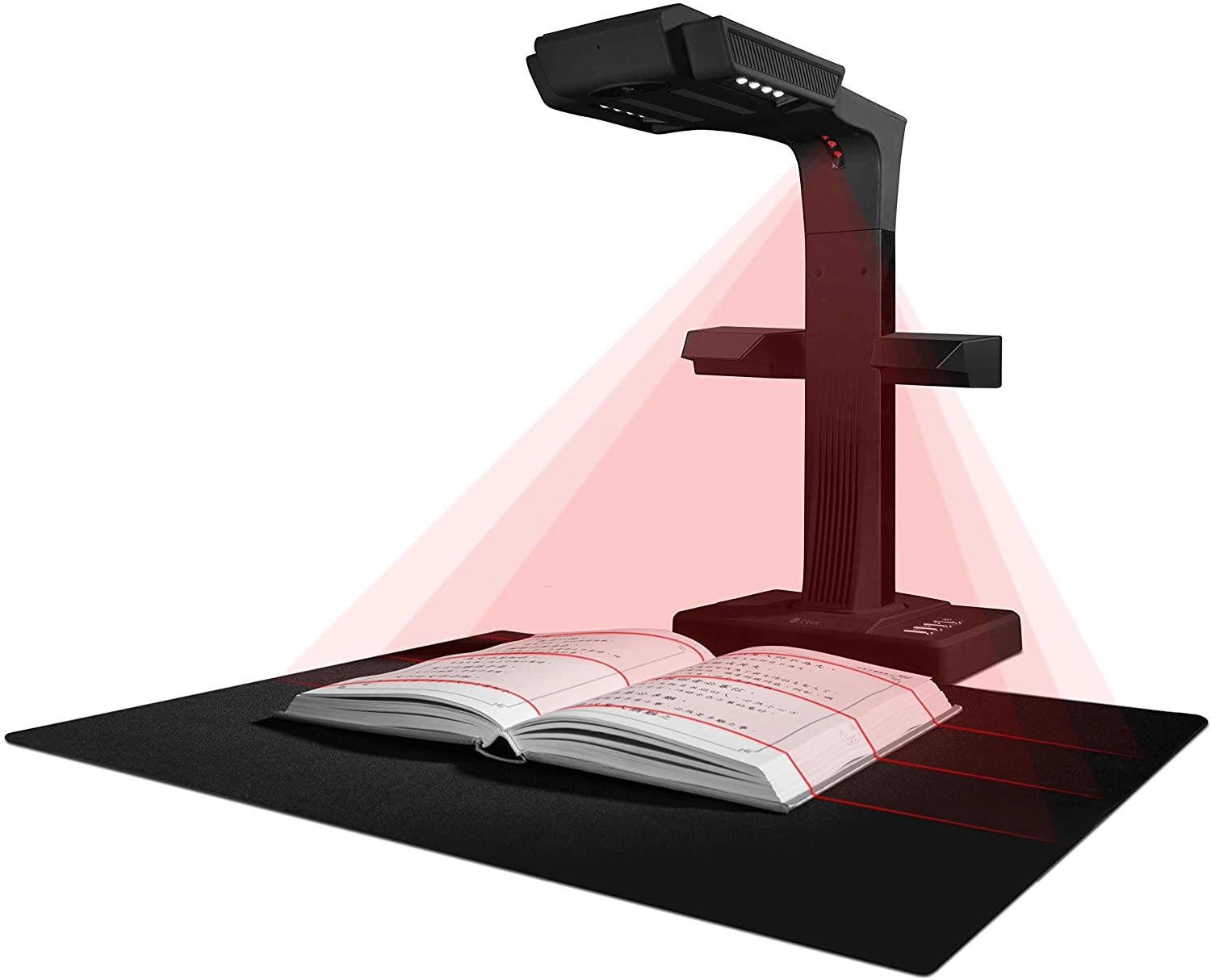
desertcart.com: CZUR Shine Ultra Smart Portable Document Scanner,
Thin Book Scanner with OCR, USB Document Camera for
Desktop/Laptop, Capture Size A3, Compatible with Windows & Mac OS
(Not for Android & iOS) : Office Products
Review: IT WORKS PRETTY GOOD detailed review - You have to be
careful with focusing and keeping the pages still, it won't scan
small papers clearly sometimes, and the light does make scanning
glossy surfaces a chore... but this thing is perfectly adequate
for most use-case-scenarios. If you're scanning things like 30
page comic books or manuals, this will do a phenomenal job... if
not a perfect one. This isn't a miracle device. You will have
errors before you get good practice. It's not *crystal* clear.
But it's not a one-trick-pony either. I've used this to scan a
500-page massive text book, paperbacks, hardcovers (easier than
paperbacks for me), family photos, handwritten notes, and as a
top-down webcam for teaching, all to perfectly usable success.
For larger documents, if you're willing to sacrifice some
resolution, you can boost the device's height on a box and get
some black fabric, making the scannable area larger. OCR still
works in common use. And oh yes, something that this device
excels in is it's desktop software's OCR function. *Excellent.*
Those who use speech-to-text software will be *very pleased* with
this device. One can simply copy and paste text right out of
one's digitized books on one's computer. You will likely not be
disappointed with it's OCR, for sure. The device comes with
everything you need. If your skin-tone doesn't work well with the
automatic finger-removal function of the software, the box
supplies you with "finger cots" which very accurately allow you
to prop the book open with no fear of distracting artifacts. It
comes with a foot pedal to scan the pages with, and also
automatic scanning in the software which sees when you turn a
page all by itself. Very nice packaging as well, very easy to
understand. This company, Czur, is known for their excellent
packaging. The speed of the scanning this device can do is
actually very impressive. More destructive techniques may be
faster, but I've scanned a 300 page novel in 10 minutes. You can
do the math there, but that's pretty darn good. Something you may
have noticed with minimal research is that this company makes
other scanners that look similar. I can confirm to you that for
consumer use, this scanner may have a lower resolution than the
(tempting) $600+ scanner that they sell, but this model is more
portable, and its resolution is *perfectly* adequate for all
common users, I would say. Do your research. Look at reviews. But
if you are in need of a non-destructive book and document scanner
that is portable (fits in my small backpack) and will scan pretty
darn fast and in good quality, along with the best OCR software
I've realistically ever used, and all for personal use, and don't
need higher resolution (which most people shouldn't), this device
is probably the best you can buy from Czur. Have a nice one.
Review: Fast, easy to use scanner with great results - Great
scanner, here's what I thought about it broken down by different
aspects: -Packaging Comes in a nice, sturdy box with a handle so
you can easily carry it and pack it up in an organized way when
you're storing it between scanning sessions. -Software The
software it comes with is straightforward and easy to use. I
really didn't even read the manual, I just installed the
software, plugged in the scanner, and figured it out and started
scanning in like 5 minutes. -Functionality How it works is it
comes with a black mat, you put your book/paper on it and select
single page mode or book mode. Single page mode scans one object
at a time, and it automatically crops the page against the black
background; there are some finger tabs for holding pages flat and
the scanner software automatically makes them disappear. For book
mode, it scans two pages at once, and splits each page into its
own separate image. I have attached some example scans from this
product, compare it to the setup photo I took with my phone -
even though the page isn't level, it automatically flattens the
perceived curve from the camera snapshot, so you don't need to
fiddle with making the pages flat. The cropping and page
flattening is great, it just works. When you're done scanning,
you can export all the images as various document types such as
word/pdf, or you can leave them as images. Of course, you can
choose where to save the base images to help keep organized. My
wife also uses this in her classroom as a visual presenter where
she can put a page underneath and write on it, and project it in
real time on her projector. -Quality I have attached photos for
black/white mode, color mode, and a final word document export. I
should also mention, the export automatically processes the image
to identify words and does a great job. I picked a page with tiny
text on a 5"x8" book and you can see from my attached images that
the camera is good enough even for tiny text, and can accurately
translate that into a word document. Note that for some glossy
pages, the light can reflect back to the camera and reduce
quality, but for matte surfaces and "regular" paper, it performs
excellent. -Speed It comes with a foot clicker so you can fully
use your hands to flip and position pages without slowing down.
Flip the page, give the camera a second to focus, press the foot
clicker and repeat. As you scan, you can see a preview image and
it's pretty apparent if something went wrong, maybe 1 out of
2-300 page flips or so I find I want to do a rescan which is
totally fine for me. Depending on how focused I am, I flip a page
every 2-4 seconds, on average maybe 15-20 page flips a minute, so
that's around 300 pages in 10 minutes! Which I think is super
good. Overall it's straightforward to use, takes good quality
scans, exports files well, and scans through books quickly. I am
very satisfied with this purchase and recommend this for anyone
who wants good, fast scans.
Reviews
Loading...
Loading...
Loading...
Loading...
Loading...
Loading...
Loading...
Loading...
Loading...
Loading...
Loading...
Loading...
Loading...
Loading...
Loading...
Loading...
Loading...
Loading...
Loading...
Loading...
Loading...
Loading...
Loading...
Loading...
Loading...
Loading...
Loading...
Loading...
Loading...
Loading...
Loading...
Loading...
Loading...
Loading...
Loading...
Loading...
Loading...
Loading...
Loading...
Loading...
Loading...
Loading...
Loading...
Loading...
Loading...
Loading...
Loading...
Loading...
Loading...
Loading...
Loading...
Loading...
Loading...
Loading...
Loading...
Loading...
Loading...
Loading...
Loading...
Loading...
Loading...
Loading...
Loading...
Join our newsletter
Be the first to know about new arrivals, sales, and exclusive picks
Sign in to unlock newsletter access and stay in the loop