Paper tray media types: Coated paper, Envelopes, Heavy paper, labels, Plain paper, Postcard, Recycled paper, Thin paper
Total output capacity: 100sheets
Multi-Purpose tray: Yes
Maximum ISO A-series paper size: A3
Duplex functions: Copy, Fax, Print
Page description languages: PCL 5c, PCL 6, UFRII
Specifications
Features
Internal memory
1000 MB
Processor frequency
1200 MHz
Control type
Touch
Security algorithms
128-bit WEP, 64-bit WEP, WPA-TKIP, WPA2-AES
Product colour
White
Printing colours
Black, Cyan, Magenta, Yellow
Greyscale levels
256
Scan to
Cloud, E-mail, FTP, PC, USB
Maximum resolution
1200 x 1200 DPI
Print technology
Laser
Display
LCD
ISO A-series sizes (A0...A9)
A4
Colour display
✓
Maximum number of copies
999 copies
Optical scanning resolution
600 x 600 DPI
Envelopes sizes
C5, Com-10, DL, Monarch
Page description languages
PCL 5c, PCL 6, UFRII
Duplex functions
Copy, Fax, Print
Maximum ISO A-series paper size
A3
Weight & dimensions
Width (imperial)
17.76 "
Weight
20800 g
Height
360 mm
Depth
460 mm
Width
425 mm
Power
AC input voltage
220 - 240 V
AC input frequency
50/60 Hz
Power consumption (max)
980 W
Power consumption (standby)
11 W
Energy Star Typical Electricity Consumption (TEC)
0.23 kWh/week
Power consumption (sleep)
0.80 W
Power consumption (printing)
370 W
Paper handling
Duplex print options
Yes
Custom media width
60 - 163 mm
ISO B-series sizes (B0...B9)
B5
Paper tray media types
Coated paper, Envelopes, Heavy paper, labels, Plain paper, Postcard, Recycled paper, Thin paper
Copying
Maximum copy resolution
600 x 600 DPI
ID-card copy function
✓
Duplex copying mode
Auto
Duplex copying
✓
Input & output capacity
Maximum input capacity
251 sheets
Multi-Purpose tray
✓
Total output capacity
100 sheets
Total input capacity
250 sheets
Auto document feeder (ADF)
✓
Total number of input trays
1
System requirements
Mac operating systems supported
Mac OS 12.4, Mac OS 13.1, Mac OS X 10.11 El Capitan, Mac OS X 10.12 Sierra, Mac OS X 10.13 High Sierra, Mac OS X 10.14 Mojave, Mac OS X 10.15 Catalina, Mac OS X 10.15.3 Catalina, Mac OS X 10.2 Jaguar, Mac OS X 10.3 Panther, Mac OS X 10.4 Tiger, Mac OS X 10.5 Leopard, Mac OS X 10.6 Snow Leopard, Mac OS X 10.7 Lion, Mac OS X 10.8 Mountain Lion, Mac OS X 10.9 Mavericks, Mac OS X 11.0 Big Sur, Mac OS X 12.0 Monterey, Mac OS X 13.0 Ventura, Mac OS X 14.0 Sonoma
Windows operating systems supported
Windows 10, Windows 11, Windows 11 Enterprise x64, Windows 8.1, Windows 8.1 Pro
Server operating systems supported
Windows Server 2016 x64, Windows Server 2022
Other features
Mobile printing technologies
Apple AirPrint, Mopria Print Service
Image formats supported
JPEG, PNG, TIFF
Print speed (black, normal quality, A4/US Letter)
21 ppm
Colour faxing
✗
Copier resize
25 - 400 %
Design
Built-in display
✓
Market positioning
Business
Computer system
Built-in processor
✓
Processor frequency
0.80 GHz
Internal memory
1 GB
Internal storage capacity
4 GB
Network
Wi-Fi
✓
Ethernet LAN data rates
10, 100
Wi-Fi standards
802.11b, 802.11g, Wi-Fi 4 (802.11n)
Ethernet LAN
✓
Ports & interfaces
USB port
✓
Direct printing
✓
Operational conditions
Operating temperature (T-T)
10 - 30 °C
Operating relative humidity (H-H)
20 - 80 %
Technical details
Printing
Colour printing
Secure printing
✓
Time to first page (colour, normal)
10.50 s
Time to first page (black, normal)
10.90 s
Maximum duty cycle
30000 pages per month
Auto document feeder (ADF) input capacity
50 sheets
Copying
Colour copying
Printing
Warm-up time
13 s
Number of print cartridges
4
Duplex printing
✓
Scanning
Scanner type
Flatbed & ADF scanner
Scan drivers
WIA
Scanning
Colour scanning
Fax
Faxing
No
File formats
Document formats supported
PDF
Product Details
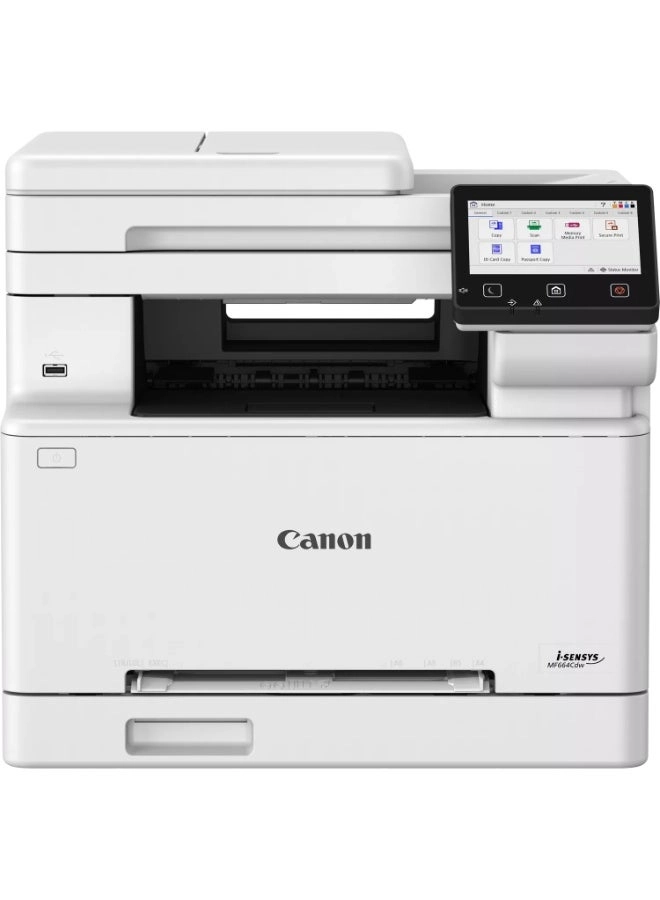
Streamline your business workflows with the connected Canon i-SENSYS MF655Cw laser printer. Extensive cloud connectivity makes it quick and easy to print and scan directly to and from popular cloud storage systems, including Google Drive, DropBox, and OneDrive. Automatic duplex printing, single-pass duplex scan and fast print speeds up to 21 ppm enhance productivity. Save even more time by printing from your smartphone and creating easy one-touch workflows to automate everyday tasks. Security features such as Secure PIN and Verify System at Startup safeguard sensitive documents and protect your device against external attacks.