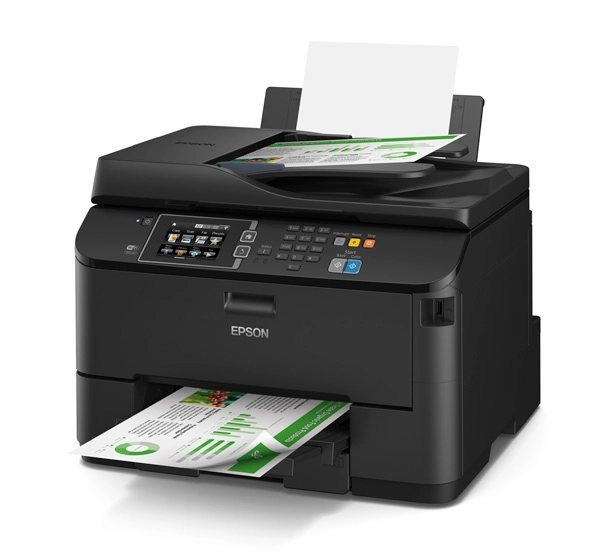


Epson WF-4830 - Inkjet
Best offer
AED
57668
AED
64740
-10%
This price may no longer be valid
Key Features
- Faxing: Colour faxing
- Duplex faxing: Yes
- Duplex copying: Yes
- Total number of input trays: 2
- Scanning: Colour scanning
- Fax resolution (black): 200 x 200DPI
- Auto document feeder (ADF): Yes
- Fax forwarding to: Fax
- Total input capacity: 250sheets
- Paper tray media types: Envelopes, Photo Paper, Plain paper
- Total output capacity: 80sheets
- Maximum ISO A-series paper size: A4
- Power consumption (copying): 17W
- Duplex print speed (colour, normal quality, A4/US Letter): 9ppm
- Page description languages: ESC/P-R
Specifications
Features
Country of origin
Indonesia
Compatible operating systems
Mac OS X 10.6.8 or later, Windows 10 (32/64 bit), Windows 7 (32/64 bit), Windows 8 (32/64 Bit), Windows 8.1 (32/64 bit), Windows Server 2003 R2, Windows Server 2003 SP2 or later, Windows Server 2008 (32/64 Bit), Windows Server 2008 R2, Windows Server 2012 (64bit), Windows Server 2012 R2, Windows Server 2016, Windows Vista (32/64 Bit), Windows XP Professional x64 Edition SP2 or later, Windows XP SP3 or later (32-bit)
Card reader integrated
✗
Near Field Communication (NFC)
✓
Control type
Touch
Security algorithms
128-bit WEP, 64-bit WEP, SNMP, WPA-PSK, WPA-TKIP
Noise level
34 dB
Standard interfaces
Ethernet, USB 2.0, Wireless LAN
Product colour
Black
Printing colours
Black, Cyan, Magenta, Yellow
Maximum resolution
4800 x 2400 DPI
Print technology
Inkjet
Display
LCD
Colour display
✓
Scan to
Cloud
Maximum scan area
216 x 297 mm
Photo paper sizes (imperial)
10x15, 13x18, 13x20, 20x25, 9x13
ISO A-series sizes (A0...A9)
A4
Optical scanning resolution
1200 x 1200 DPI
Envelopes sizes
10, C6, DL
Printing method
Epson PrecisionCore
Page description languages
ESC/P-R
Maximum ISO A-series paper size
A4
Packaging data
Package weight
14100 g
Package height
405 mm
Package depth
480 mm
Package width
436 mm
Weight & dimensions
Width (imperial)
16.73 "
Weight
11900 g
Height
330 mm
Depth
388 mm
Width
425 mm
Display
Touchscreen
✓
Power
AC input voltage
100 - 240 V
AC input frequency
50 - 60 Hz
Power consumption (off)
0.20 W
Power consumption (sleep)
3.80 W
Power consumption (ready)
8.60 W
Power consumption (copying)
17 W
Paper handling
Duplex print options
Yes
Photo paper sizes
10x15, 13x18, 13x20, 20x25, 9x13
ISO B-series sizes (B0...B9)
B5
Paper tray media types
Envelopes, Photo Paper, Plain paper
Copying
Duplex copying
✓
Input & output capacity
Paper input type
Cassette
Maximum input capacity
500 sheets
Total output capacity
80 sheets
Total input capacity
250 sheets
Auto document feeder (ADF)
✓
Total number of input trays
2
System requirements
Mac operating systems supported
Mac OS X 10.6 Snow Leopard
Windows operating systems supported
Windows 10, Windows 10 x64, Windows 7, Windows 7 x64, Windows 8, Windows 8 x64, Windows 8.1, Windows 8.1 x64, Windows Vista, Windows Vista x64, Windows XP, Windows XP Professional x64
Server operating systems supported
Windows Server 2003, Windows Server 2003 R2, Windows Server 2008, Windows Server 2008 R2, Windows Server 2008 x64, Windows Server 2012 R2, Windows Server 2012 x64, Windows Server 2016
Other features
Mobile printing technologies
Apple AirPrint, Epson Connect, Epson Email Print, Epson Remote Print, Epson iPrint, Mopria Print Service
Image formats supported
BMP, JPEG, PNG, TIFF
Modem speed
33.60 Kbit/s
Fax memory
180 pages
Fax speed dialing (max numbers)
60
Duplex print speed (black, normal quality, A4/US Letter)
16 ppm
Modem type
33.6 Kbit/s
Print speed (colour, normal quality, A4/US Letter)
22 ppm
Print speed (black, normal quality, A4/US Letter)
36 ppm
Design
Built-in display
✓
Market positioning
Home & Office
Packaging content
Warranty card
✓
Drivers included
✓
Cables included
AC
Cartridge(s) included
✓
Network
Wi-Fi
✓
Supported network protocols
TCP/IPv4, TCP/IPv6
Management protocols
APIPA, BOOTP, DDNS, DHCP, HTTP, LLTD, Ping, SLP, SNMP, SNTP, WSD, mDNS
Cabling technology
10/100Base-T(X)
Ethernet LAN data rates
10
Wi-Fi standards
802.11b, 802.11g, Wi-Fi 4 (802.11n)
Ethernet LAN
✓
Ports & interfaces
USB port
✓
Technical details
Ink drop
3.8
Print head nozzles
256 nozzles per colour
Auto-redialing
✓
Printing
Colour printing
Time to first page (colour, normal)
8.50 s
Time to first page (black, normal)
5.50 s
Maximum duty cycle
33000 pages per month
Auto document feeder (ADF) input capacity
50 sheets
Copying
Colour copying
Error Correction Mode (ECM)
✓
Printing
Duplex print speed (ISO/IEC 24734, A4) colour
9 ppm
Duplex print speed (ISO/IEC 24734, A4) black
16 ppm
Print speed (ISO/IEC 24734) black
25 ppm
Number of print cartridges
4
Print speed (ISO/IEC 24734) colour
12 ppm
Duplex printing
✓
Duplex print speed (colour, normal quality, A4/US Letter)
9 ppm
Scanning
Scan technology
CIS
Scanner type
Flatbed scanner
Duplex scanning
✓
Scanning
Colour scanning
Fax
Fax forwarding to
Fax
Fax resolution (black)
200 x 200 DPI
Duplex faxing
✓
Faxing
Colour faxing
Call management
Speed dialling
✓
File formats
Document formats supported
PDF
Logistics data
Harmonized System (HS) code
84433100
Pallet gross weight
0 g
Pallet weight (UK)
0 g
Product Details
PRECISIONCORE - PERFORMANCE BEYOND LASER
Powered by PrecisionCore, this all-in-one delivers fast, high-quality prints, up to 50 percent lower printing costs vs. colour laser1, up to 330-sheet paper capacity, auto 2-sided print/copy/scan and 30,000-page monthly duty cycle2.
KEY FEATURES & BENEFITS
- Get Performance Beyond Laser – the WorkForce WF-4630 powered by PrecisionCore
- Save on ink – up to 50 percent vs. colour laser
- Higher colour resolution – high-quality text, colour graphics and images
- Fastest printing – professional-quality prints at speeds of 20 ISO ppm (black) and 20 ISO ppm (colour)
- Versatile paper handling – up to 330-sheet capacity, with an 80-sheet rear tray; plus auto 2-sided print, copy and scan
- Easy navigation and control – intuitive colour touchscreen
- Remarkable durability – 30,000-page monthly duty cycle for high-volume printing
- Laser-sharp black text – crisp fonts, precise lines and neat edges on plain paper
- Extremely durable prints – fade, water and smudge resistant output
- Print anywhere, anytime – from iPad®, iPhone®, tablets and smartphones with wireless and Wi-Fi Direct
PRECISIONCORE INKJET TECHNOLOGY
Introducing PrecisionCore, the next generation of inkjet printing technology. From professional and industrial-level printers to your desktop inkjet, this groundbreaking technology delivers fast printing with superior quality results. A truly innovative system, PrecisionCore features Epson's advanced thin-film piezoelectric (TFP) elements, which are produced via the MEMS manufacturing process, based on semiconductor micro-fabrication techniques. At the core of this proprietary technology is the PrecisionCore MicroTFP print chip, a digital chip that prints at the micron level — 1/100th the size of a human hair. It's this extraordinary focus on accuracy and detail that enables PrecisionCore to deliver revolutionary results, whatever the task at hand.
Super Fast auto two-sided print speeds
The WorkForce Pro WF-4630 delivers professional quality, two-sided colour prints at super fast print speeds, making it easy to increase productivity, without compromising quality. Boasting drastically improved print speeds of up to 20 ISO ppm (black) and 20 ISO ppm (colour), any project can be handled with speed and ease.
Ultra efficient paper handling
The WorkForce Pro WF-4630 boasts a 250-sheet paper tray and also includes an 80-page tray for envelopes, labels and specialty media for efficient paper handling. Additionally, the two-sided Automatic Document Feeder will copy and scan one- and two-sided originals.
High-speed faxing
The 35-page Automatic Document Feeder enables quick faxing of one or two-sided documents. Faxing speed is as fast as 3 seconds per page, including 550 page memory capacity with storage of up to 200 numbers. For enhanced productivity, PC-Fax is included allowing a fax to be sent directly from a computer.
Change cartridges less often
Save up to 50% lower printing costs than colour lasers. With the extra-large, high capacity 786XL cartridges, users can print more than four reams of paper at a time before changing cartridges6. Utilising the 786XL cartridges, the WorkForce Pro WF-4630 achieves a yield of approximately 2600 pages in black and 2000 in colour.
Alternatively, for users with lower print volume requirements, the 786 cartridges can achieve a yield of approximately 900 pages in black and 800 in colour.
Replace only the colour you need with affordable, individual ink cartridges.
Save energy, save paper
With the WorkForce Pro WF-4630's automatic, two-sided printing and copying, users can save up to 50% on paper supply. In addition, the WF-4630 saves energy by using up to 70% less power than laser printers.
Designed to reduce paper jams
To maximise office productivity and efficiency Epson have designed and engineered the WorkForce WF-4630 to be jam-free.
Reliability
A durable performer, the WorkForce Pro WF-4630 boasts a duty cycle of 30,000 pages2. This dependable workhorse also comes with a one-year return-to-base warranty for dependable service and support. Phone support is included, without charge, for the life of the product.
Epson Connect - Print anywhere, anytime
The new WorkForce Pro WF-4630 features a new paradigm of mobile printing convenience. Epson Connect and other supported services give users the freedom to print photos, documents and web pages wirelessly over a home network, or even remotely from anywhere in the world. Epson Connect comprises of Epson Connect Email Print, which allows customers to print electronic mail and file attachments by sending them to an e-mail enabled Epson printer.
Also part of Epson Connect is Epson iPrint support, empowers users to access, print and save photos and documents on iOS devices.
Users can also scan them to their devices or send them via email. This application can be downloaded free of charge from the Apple® iTunes® store.
Support for AirPrint enables direct wireless printing from iOS devices, without the need for additional drivers or software downloads.
Google Cloud Print support allows users to print out documents, spreadsheets and presentations stored on the Google cloud. This is ideal for Epson users who need to create, access, edit and print their documents while on the move. Google Cloud Print is compatible with a wide variety of mobile devices.
Built-in wireless networking
The WorkForce Pro WF-4630 is Wi-Fi CERTIFIED™ enabling networking which delivers up to 2.5 times the performance of the previous standard 802.11g6. The WF-4630 features Wi-Fi Direct enabling users to easily connect to wireless networks in seconds, allowing printing from virtually any room in the office.
3.5" smart touch panel
The WorkForce Pro WF-4630 features a large, intuitive touch panel for quick and easy navigation through critical tasks. Smart and simple icons make any task easy.
Convenient scanning features
The WorkForce Pro WF-4630 will scan and save electronic copies of printed reports, or turn documents into editable text with the OCR software7 included. Additional features include scan-to-PDF. The wireless connection enables the user to select a computer to send a file to the printer’s USB port and allows files to be uploaded straight to the PC.
Laser sharp text and vibrant graphics
Exclusive to Epson, DURABrite® Ultra Ink is a versatile pigment based, 4 colour ink technology which delivers brilliant, ultra-sharp detail on plain and specialty papers. These fast drying inks deliver durable prints which are water, fade and smudge resistant, as well as highlighter friendly.
This printer is designed to function only with genuine Epson ink cartridges and not with third party ink cartridges. The printer may not function properly or at all if you use third party ink cartridges.
Reviews
Loading...
Loading...
Loading...
Loading...
Loading...
Loading...
Loading...
Loading...
Loading...
Loading...
Loading...
Loading...
Loading...
Loading...
Loading...
Loading...
Loading...
Loading...
Loading...
Loading...
Loading...
Loading...
Loading...
Loading...
Loading...
Loading...
Loading...
Loading...
Loading...
Loading...
Loading...
Loading...
Loading...
Loading...
Loading...
Loading...
Loading...
Loading...
Loading...
Loading...
Loading...
Loading...
Loading...
Loading...
Loading...
Loading...
Loading...
Loading...
Loading...
Loading...
Loading...
Loading...
Loading...
Loading...
Join our newsletter
Be the first to know about new arrivals, sales, and exclusive picks
Sign in to unlock newsletter access and stay in the loop