Allware
Loading...
  • News
  • Price drops
  • New arrivals
  • Featured categories
  1. Computers & Peripherals
  2. Data Input Devices
  3. Mice
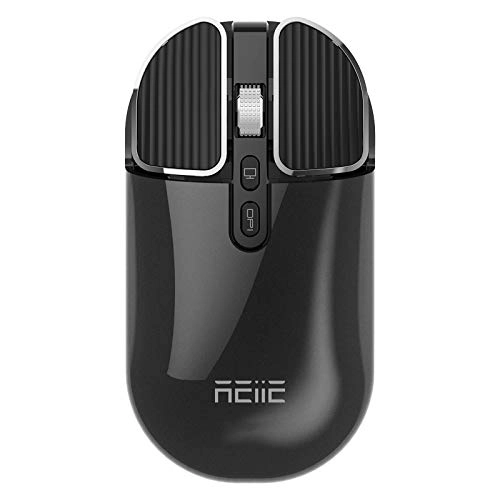
Wireless Mouse - Bluetooth 5.1+2.4G

REIIE Wireless Mouse - Bluetooth 5.1+2.4G

Best offer
AED
8606

Key Features

  • Product colour: Black
  • Product dimensions: 11.1 x 5.5 x 2.3 cm
  • Weight: 140g
  • Number of buttons: 3buttons
  • Special features: Aufladbar, Geruschlos, Kabellos
  • Batteries: 1 Lithium Polymer batteries required. (included)
  • Offers
  • Price History
  • Specifications
  • Product Details
  • Review IconReviews

Specifications

Features

Special features
Aufladbar, Geruschlos, Kabellos
Number of buttons
3 buttons
Product colour
Black

Weight & dimensions

Weight
140 g
Product dimensions
11.1 x 5.5 x 2.3 cm

Technical details

Batteries
1 Lithium Polymer batteries required. (included)

Product Details

REIIE Wireless Bluetooth Mouse One mouse, two options. Bluetooth connection and 2.4GHz wireless connection. Bluetooth 5.0 connectivity and no USB interface required, fast and stable connection, greatly simplifies life. For devices without Bluetooth, this mouse also solves the problem with a USB nano receiver, plug and play, no additional drivers or software required. Bluetooth mode. Working distance: 10m System requirements: Windows 8, Windows 10 or above, Mac OS X 10.10 or higher, Android 5.0 or higher, iOS 13 or higher. Steps: 1. Turn on the Bluetooth function of the device. 2. Switch left to ON/OFF. (Bluetooth mode) 3. Search for the Bluetooth product and search for the mouse "BT5.1" to pair it. Then you can use the mouse in Bluetooth mode. 2.4 GHz mode. Working distance: 10m System requirements: Windows 7, Windows 8, Windows RT, Windows 10 or higher, Mac OS X 10.08 or later. Steps: 1. Plug the wireless nano receiver into the USB port of the computer. 2. Press the ON/OFF button at the bottom of the mouse on the ON side. 3. Move the mouse or tap the left and right buttons to use it. Instructions for iPad: 1. Update to iOS 13 system. 2. Open the settings after system update, input devices Touch Assist Touch Open, 3. Move the mouse to Bluetooth pairing mode, open the phone or tablet and search for pairing. How to charge 1. It is recommended to use the USB interface of the computer to charge the mouse. 2. The wheel lights up blue during charging. During charging, the light turns off after 1-2 hours when the battery is fully charged. Bluetooth installation and 2.4G (dual mode).

Reviews

Loading...
Loading...
Loading...
Loading...
Loading...
Loading...
Loading...
Loading...
Loading...
Loading...
Loading...
Loading...
Loading...
Loading...
Loading...
Loading...
Loading...
Loading...
Loading...
Loading...
Loading...
Loading...
Loading...
Loading...
Loading...
Loading...
Loading...
Loading...
Loading...
Loading...
Loading...
Loading...
Loading...
Loading...
Loading...
Loading...
Loading...
Loading...
Loading...
Loading...
Loading...
Loading...
Loading...
Loading...
Loading...
Loading...
Loading...
Loading...
Loading...
Loading...
Loading...
Loading...
Loading...
Loading...

Join our newsletter

Be the first to know about new arrivals, sales, and exclusive picks

Sign in to unlock newsletter access and stay in the loop

Allware
info@allware.com
+971522500911
World technology awards winner badge

Allware

  • About Us
  • Terms And Conditions
  • Privacy Policy
  • Contact Us

Partners

  • Why become a partner?
  • How to list your Online Shop?

Newsletter

  • Subscribe

Info

  • How Allware works
All Rights Reserved.
Please enable location access or select an emirate
-
00:00:00
Prayer timings

Offers (1)

Amazon logo

1 offer

From
AED
86

REIIE Bluetooth Maus Kabellose, Silent Funkmaus (Bluetooth 5.1+2.4G Wireless), Schnurlos Wireless Optische Maus für PC/Tablet/Laptop und Windows/Mac/Linux/Android/iOS/iPadOS, Schwarz.

Black
AED
8606

Price History

Price History Skeleton
Price History Shimmer Effect
Loading price history...

Similar Products

See all
-19%
ATTACK SHARK X11 Gaming Mouse - Wireless

ATTACK SHARK X11 Gaming Mouse - Wireless

AED
11000
AED
8900
42 offers
UrbanX 2.4GHz Rechargeable Wireless LED Mouse - Bluetooth

UrbanX 2.4GHz Rechargeable Wireless LED Mouse - Bluetooth

AED
5194
36 offers
-6%
Logitech PRO X SUPERLIGHT 2 Gaming Mouse - Wireless

Logitech PRO X SUPERLIGHT 2 Gaming Mouse - Wireless

AED
48200
AED
44900
33 offers
Seenda Wireless Mouse - USB

Seenda Wireless Mouse - USB

AED
5500
30 offers
blingbybri Crystal Rhinestone Wireless Mouse - wireless

blingbybri Crystal Rhinestone Wireless Mouse - wireless

AED
6971
29 offers
UrbanX UXM030 - Bluetooth

UrbanX UXM030 - Bluetooth

AED
5924
28 offers
LeadsaiL Wireless Mouse - USB

LeadsaiL Wireless Mouse - USB

AED
4764
25 offers
Fawoonu Motospeed Darmoshark M3 Mouse - 2.4G/BT5.0/Type-C

Fawoonu Motospeed Darmoshark M3 Mouse - 2.4G/BT5.0/Type-C

AED
1587
24 offers
memzuoix Ergonomic Mouse - Wireless

memzuoix Ergonomic Mouse - Wireless

AED
6194
24 offers
Elprico Wireless Mouse - 2.4G BT1 BT2

Elprico Wireless Mouse - 2.4G BT1 BT2

AED
3419
23 offers

More from REIIE

See all
REIIE Wireless Mouse - Bluetooth 5.1+2.4G

REIIE Wireless Mouse - Bluetooth 5.1+2.4G

AED
8606
1 offer
REIIE HY300 Pro 1280 x 720 pixels

REIIE HY300 Pro 1280 x 720 pixels

AED
26665
2 offers
Loading...
Loading...
Loading...
Loading...
Loading...
Loading...
Loading...
Loading...
Loading...
Loading...
Loading...
Loading...
Loading...
Loading...
Loading...
Loading...
Loading...
Loading...
Loading...
Loading...
Loading...
Loading...
Loading...
Loading...
Loading...
Loading...
Loading...
Loading...
Loading...
Loading...
Loading...
Loading...
Loading...
Loading...
Loading...
Loading...